

Answers from your own SharePoint documents, with the source.
Ask your SharePoint in plain words. Answergrove answers the question and names the document, the page and the SharePoint version it came from, so anyone can check it. People only get answers from content they are allowed to open. Made for organisations of 50 to 500 people whose daily work depends on SharePoint documents: quality manuals, procedures, contracts and project files. First step: a two-week pilot on one SharePoint site, €1,500 fixed, credited to the rollout if you continue. On day 5 we test it with a restricted document you pick, to show that nobody gets an answer from a file they may not open. The pilot runs in our EU Azure environment, so you need no Azure subscription for it.
AskWhat are the payment terms in last quarter’s supplier agreement?
It’s Net 30 from the invoice date, with a 2% early-payment discount if you settle within 10 days (§4.1).
What is Answergrove?
Answergrove by KSJ is a private AI assistant for SharePoint. It answers your team’s questions from your own SharePoint documents and lists. Every answer names the document, the page and the SharePoint version it came from, so anyone can check it, and people only get answers from content they are allowed to open. Made for organisations of 50 to 500 people whose daily work depends on SharePoint documents: quality manuals, procedures, contracts and project files. Rollout is a one-time project from €4,950, with no per-user licence, installed in your own Azure subscription. Answergrove runs at a construction company across 865 SharePoint sites with about 400,000 documents in four languages.
The answer exists. Search returns files.
Ask your SharePoint search what the payment terms are with a supplier and you get a list of files called Agreement_v3_FINAL. Someone opens them one by one, finds last year’s version, and asks a colleague anyway. At audit time the question is harder: which version was in force, who approved it, and who could see it.
Answergrove answers from the documents and registers you must get right, with the source next to the answer. It works with or without Microsoft Copilot.
Keep Copilot for everyday work. Give every employee answers from the documents you must get right. How the two work together.
One assistant that answers with the source.
Answergrove is built for your documents:
- Reads only the sites you choose. The indexing app can read only those sites, and the index updates automatically as documents change.
- Answers with document, page and version, plus the approval status where your library uses SharePoint content approval. If the answer is not in your documents, it says so instead of guessing.
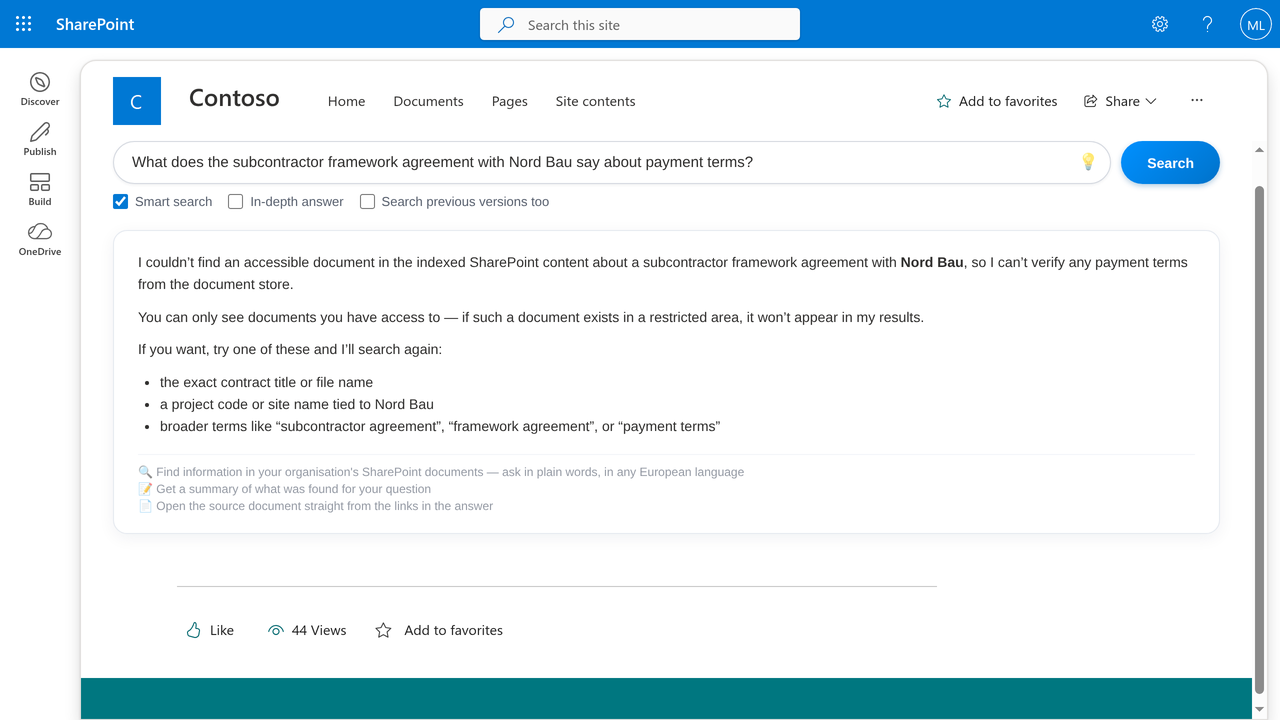
- Checks permissions before it shows anything, so nobody sees more than they could already open. The pilot starts with a check of who can see what on the site, so that documents shared too widely are closed before the assistant can find them.
- When libraries move, answers stay clean. Your admin decides what Answergrove reads from one SharePoint list, with no code and no redeploy. Exclude a library and its content leaves the assistant on the next cycle. Keep the old copy “just in case” and answers still come from the newest version each user is allowed to open. Files that cannot be read show up in an admin report instead of silently stalling the index.
After rollout, the index, the AI and the logs run in your own Azure subscription. Language models are Azure OpenAI in the EU Data Zone. The pilot runs in the Microsoft Azure environment of SIA KSJ in Sweden Central (EU), with SIA KSJ as your GDPR processor; the pilot index, document excerpts and logs are deleted within 30 days after it ends. The full terms are in the Answergrove privacy policy.
Each does its own job, and Answergrove works with or without Copilot.
Three steps from question to answer.
Index
The sites you choose are indexed, and the index updates automatically as documents change. During the pilot this runs in our EU Azure environment; after rollout, in your own Azure subscription.
Ask
People ask in plain words, in their own language. The assistant finds the relevant passages and answers only from what that person is allowed to see.
Check
Every answer names the document, the page and the SharePoint version it came from, so anyone can check it. Where your library uses SharePoint content approval, the approval status is shown too.
What it looks like
What your team gets.
An answer, not a list of files
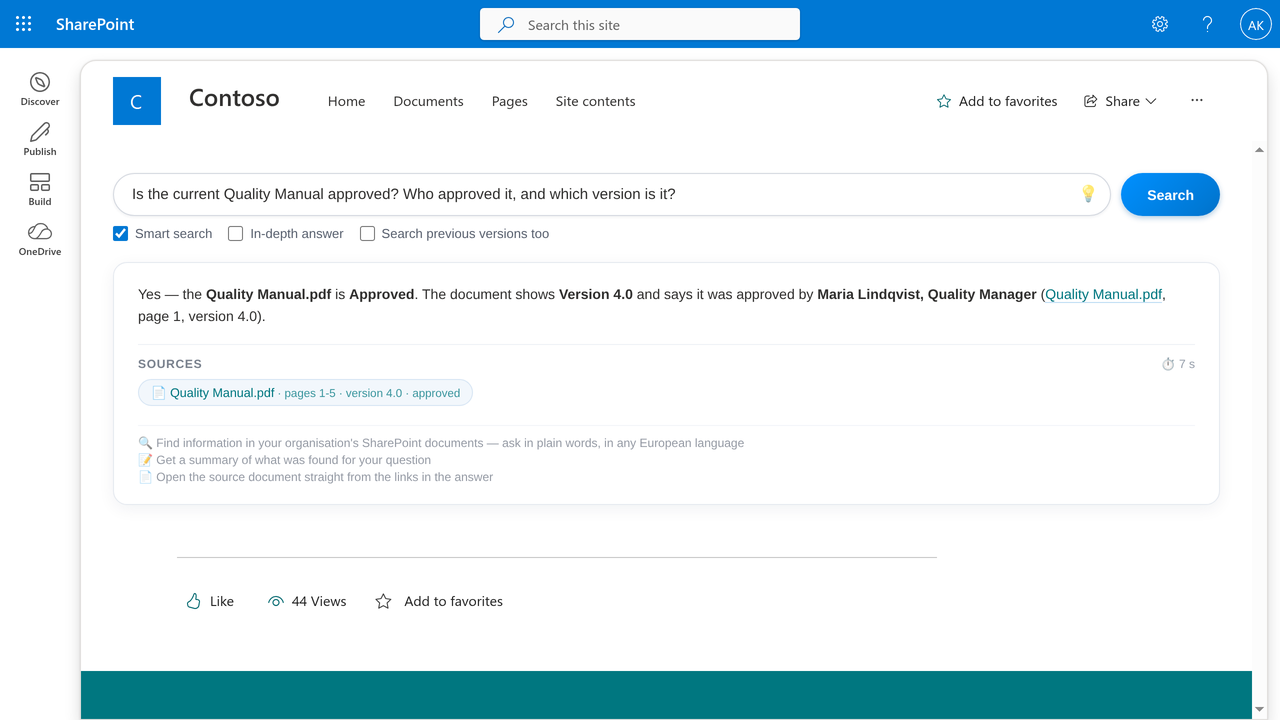
Ask in plain words: “Which version of the quality manual applies, and when was it approved?”
The source with every answer
Document, page and version, plus the approval status where your library uses SharePoint content approval.
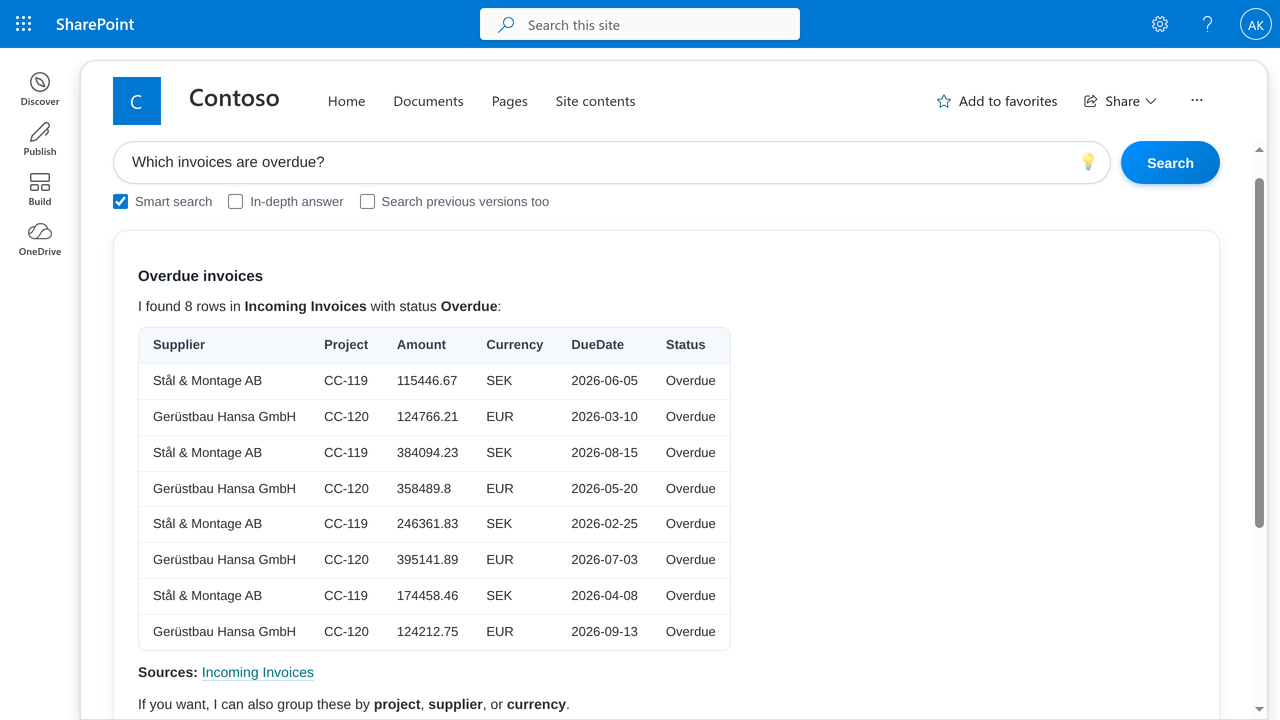
Answers from your registers
Contracts, equipment or supplier lists kept as SharePoint lists are read live, not guessed.
Any European language
Teams in different countries use the same documents: a Swedish procedure can answer a question asked in English.
Earlier versions on request
When an auditor asks what applied last year, ask “what did version 3.0 say?”
E-mails, tasks and invitations
Answergrove also prepares e-mails, tasks and meeting invitations from the chat, in your own name. You check each one and send it yourself.
Built on Microsoft, data stays in the EU.
Requirements: Microsoft 365 with SharePoint Online and Microsoft Entra ID. A Global Admin approves two app registrations; the indexing app can read only the sites you choose. For the rollout you also need an Azure subscription in your tenant; the pilot needs none.
Answergrove is built and delivered by SIA KSJ, Latvia (EU), a member of the Microsoft AI Cloud Partner Program.
What we have actually shipped.
Answers from about 400,000 documents
Answergrove runs at a construction company across 865 SharePoint sites with about 400,000 documents in four languages.
Delivered: It went live there in about eight working days. Read the case.
Invoice automation that stuck
An international construction company processing about 500 supplier invoices a month across sites in three countries, with approvals stalled on email.
Delivered: A 12-flow Power Automate and Azure system cut the approval cycle from about 5 to 3.5 days and saves about 260 hours a year (client team’s estimate), still in production after 5+ years.
750+ hours a year automated (our calculation)
Leave requests, contract tracking, travel booking, and document filing all handled by hand across 100+ staff.
Delivered: 10+ Power Automate solutions removed an estimated 750+ hours of manual processing every year (our calculation), with audit trails and Teams notifications built in.
A SharePoint estate, modernised
100+ office users on 50+ classic SharePoint sites.
Delivered: 50+ classic sites migrated to modern SharePoint for 100+ office users.
Real client engagements, anonymised under NDA. Delivered by KSJ’s founder: Microsoft-certified, 20 years with SharePoint (since 2006).
Transparent pricing. Honest scope.
Answergrove Pilot
Two weeks, fixed price, on one SharePoint site you choose. It starts with a check of who can see what on that site, so that documents shared too widely are closed before the assistant can find them, and ends with a written summary. The pilot runs in our EU Azure environment, so there is no Azure bill for you.
- One SharePoint site, your choice
- Access check: who can see what, before anything is indexed
- Runs in SIA KSJ’s Azure in Sweden Central (EU); no Azure subscription needed
- Answers with document, page and version
- Day 10: written summary and a fixed price for the rollout
- If it is not what you need, it ends on day 10; pilot data deleted within 30 days
- Credited to the rollout if you continue
Starter
Up to 50 active users. Answergrove installed in your own Azure subscription; the sites in scope are confirmed in writing on day 10 of the pilot.
- Answers with document, page and version
- Answers from your SharePoint lists (registers)
- Setup in your own Azure subscription; Azure usage is billed there
- 2 weeks of refinement
- Delivery: 3-4 weeks
Pro
Up to 150 active users. Everything in Starter, with a longer refinement period.
- Everything in Starter
- 4 weeks of refinement
- Delivery: 5-7 weeks
Enterprise
150+ users. Everything in Pro, with IT staff training and six months of priority support. Scope and final price defined after the pilot.
- Everything in Pro
- IT staff training
- 6 months of priority support
- Delivery: 8-12 weeks
All prices exclude VAT. Rollout payment: 50% at the start, 50% on completion. Rollout is a one-time project with no per-user licence; Azure usage is billed in your own Azure subscription. Scope and final price for Enterprise defined after the pilot.
Honest answers to honest questions.
We already have Microsoft Copilot, or we could build a Copilot agent on a SharePoint site. Why Answergrove?
Keep Copilot: Answergrove runs alongside Copilot without interfering with it, and gives every employee, with or without a Copilot seat, answers from the documents they must get right. No agent to build: it comes ready and tested, and setup starts with a check of who can see what. Every answer names the document, the page and the SharePoint version, plus approval status where your library uses content approval. No Copilot licence needed, no per-user licence: one fixed project price, same SharePoint permissions.
Where is our data processed and stored, who has access to it, and what about GDPR?
Pilot data is stored in SIA KSJ’s Azure, Sweden Central (EU), and processed only in the EU, with us as your GDPR processor. After purchase, index, AI and logs run in your Azure subscription; we access it only for installation and support, with your permission. AI models are Azure OpenAI: the answering models in the EU Data Zone, the index model in Sweden Central (EU). Microsoft is our only sub-processor; documents, questions and answers are not used to train models. Users get answers only from documents they may open. Pilot data is deleted within 30 days after it ends. A data processing agreement (DPA) is available on request. The full terms are in the Answergrove privacy policy.
What does it cost: the pilot, the product and running it?
Pilot: EUR 1,500 fixed, one SharePoint site, two weeks, in our EU Azure (no Azure bill for you), credited to the rollout if you continue. Rollout is a one-time project, no per-user licence: Starter EUR 4,950 (up to 50 active users), Pro EUR 9,950 (up to 150), Enterprise from EUR 19,950; optional support from EUR 450 a month. Running cost after rollout, in your Azure: about EUR 70-130 a month for 100 people asking three questions daily, by our calculation. Prices exclude VAT.
Who sees what? Can an employee get an answer from a document they are not allowed to open?
No. Answergrove checks SharePoint permissions before anything is shown, using the signed-in user’s Microsoft Entra ID identity. Each document found is checked against Microsoft 365 as that user; anything they cannot open is dropped before the AI sees it, so it cannot reach the answer or its sources. If their documents hold no answer, it says so. In the pilot we first check who can see what, and day 5 is a permission test with a restricted document you choose.
Our documents are in several European languages. Does it work in our languages?
Yes, it does. Answergrove works in any European language: a Swedish procedure can answer a question asked in English, and a question in English can be answered from a German contract, with the page and version cited. In the two-week pilot on one SharePoint site, your team asks real questions on your own documents. In production, Answergrove runs at a construction company across 865 SharePoint sites with about 400,000 documents in four languages.
Which sources and file types does it cover: only SharePoint, or also OneDrive, Teams, e-mail, PDF, Excel and drawings?
Indexed sources are SharePoint only: the document libraries and lists you choose. Files shared in Teams channels live in SharePoint sites, so they are covered when you choose those sites; files shared in chats live in personal OneDrive and are not. PDF, Word, Excel, PowerPoint and text files are indexed; citations name the PDF page, Excel sheet and rows, or PowerPoint slide. Scanned PDFs without a text layer are not read. Registers kept as SharePoint lists are read live.
We already have a DMS (M-Files, DocuWare, or SharePoint with search). What does Answergrove add?
It adds the answer itself, not a list of files: the answer names the document and its SharePoint version, the page (PDF), the sheet and rows (Excel) or the slide (PowerPoint), plus the approval status where your library uses SharePoint content approval. Registers kept as SharePoint lists are read live, not guessed. People only get answers from content they are allowed to open. One limit: it reads SharePoint, not M-Files or DocuWare. Pilot: one site, two weeks, EUR 1,500 fixed.
We are building our own AI assistant (Copilot Studio, Azure OpenAI, an internal team). Why should we buy one?
You buy a ready, tested assistant; building one means choosing sources, writing instructions and testing. At a construction company it went live in about eight working days across 865 SharePoint sites. No Copilot licence needed; works with or without a Copilot seat. Rollout: one fixed project price, no per-user licence, in your own Azure subscription. Every answer names the document, page and SharePoint version; permissions are checked first. Pilot: one site, two weeks, EUR 1,500, credited to the rollout if you continue.
Which AI model do you use, is our data used to train it, and how accurate are the answers?
Answergrove uses Azure OpenAI models: gpt-5.4-mini for standard answers and gpt-5.4 for In-depth answers, in EU Data Zone deployments; text-embedding-3-large for the index, in Sweden Central (EU). SIA KSJ does not use your documents, questions or answers to train any model; Microsoft states that prompts and responses are not used for training. We quote no accuracy percentage. Every answer names the document, page and SharePoint version, so anyone can check it; when the documents hold no answer, it says so.
How long is the pilot, what do we need to prepare, and what happens afterwards?
Two weeks, one SharePoint site, EUR 1,500 fixed. You name the site and 5 to 10 real questions; your Global Admin spends about ten minutes on two app registrations. The pilot runs in SIA KSJ’s EU Azure (Sweden Central): no Azure subscription needed. Day 5: permission test with a restricted document you choose. Day 10: written summary, fixed rollout price, pilot fee credited. Rollout: one-time project from EUR 4,950 in your own Azure subscription. If you stop, pilot data is deleted within 30 days.
How long does deployment take?
Pilot: 2 weeks on one SharePoint site. Starter: 3 to 4 weeks from project start. Pro: 5 to 7 weeks. Enterprise: 8 to 12 weeks. Start with the pilot to see it working on your own documents before committing to scope.
What if our SharePoint is messy or unstructured?
Most are. Answergrove handles unstructured content well; it doesn’t depend on consistent metadata or folder hierarchies. During the pilot we identify any preprocessing that would significantly improve answer quality.
Can it integrate with our existing systems?
It reads your SharePoint documents and the registers you keep as SharePoint lists, live. Other systems are not part of the standard rollout; if you need one, the scope and price are agreed in writing first.
Who maintains it after deployment?
You do, with documentation and the refinement period of your tier: two weeks for Starter, four for Pro, six months of priority support for Enterprise. We can provide ongoing managed support starting at €450 per month if preferred.
Start with one SharePoint site
Tell us which site or library you would start with and what your team keeps asking.
Start with a two-week pilot on one SharePoint site, €1,500 fixed.
Send the address of the SharePoint site or library you want to start with, plus 5 to 10 real questions your team asks about it. You receive the two-week pilot plan and a short pilot agreement with SIA KSJ. No call needed. The pilot runs in our EU Azure environment, so there is no Azure bill for you. If it is not what you need, it ends on day 10 and its data is deleted within 30 days. If you continue, the €1,500 is credited to the rollout.
Prefer to see it first? View the demo (opens in a new tab), no sign-in needed.